
Table of Contents
Auto-posting ERAs #
Overview #
Billing teams can now automatically post payments to multiple patient accounts from Billing > Posting > ERA. The system analyzes each payment against predefined acceptable amounts and recommends the appropriate action, streamlining the posting workflow and reducing manual effort.
Prerequisites #
- Acceptable payment amounts as ‘Min Payment Charges‘ must be defined in the fee schedule for each CPT code
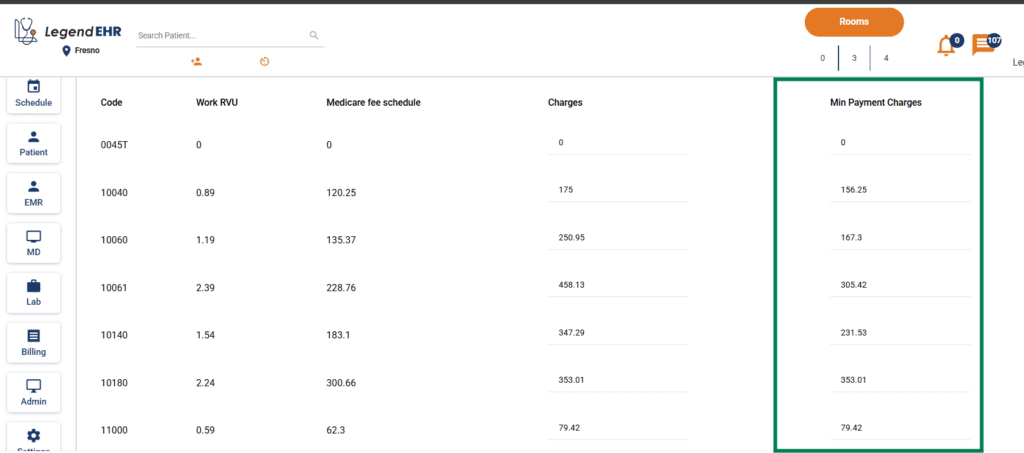
- Records without a defined threshold cannot be auto-posted until an acceptable payment is configured
How It Works #
When an ERA is received, the system evaluates each CPT code’s allowed payment against the acceptable payment defined in the fee schedule and assigns one of the following recommendations:
| Recommendation | Condition |
| Post | Allowed payment is equal to or greater than the acceptable payment |
| Resubmit | Allowed payment is $0 for all CPT codes |
| Challenge | At least one CPT code has an allowed payment greater than $0 but less than the acceptable payment |
| Define Threshold | No acceptable payment is configured for a CPT code |
Posting Behavior #
- Only records recommended as Post are selectable for auto-posting
- Upon posting, payments are either posted to the patient’s account or billed to secondary insurance, based on the ERA received
Notes #
- Recommendations are system-generated and based on fee schedule configuration
- Billing teams retain full control — no records are posted without manual selection and confirmation


