Batch Eligibility Feature #
Overview #
The Batch Eligibility feature allows users to automatically verify insurance eligibility for patients with scheduled appointments. It also provides an option to notify ineligible patients via email and SMS.
Accessing the Feature #
- Navigate to Settings Module
- Locate the Batch Eligibility Settings section
Configuring Batch Eligibility Runs #
Schedule Eligibility Checks #
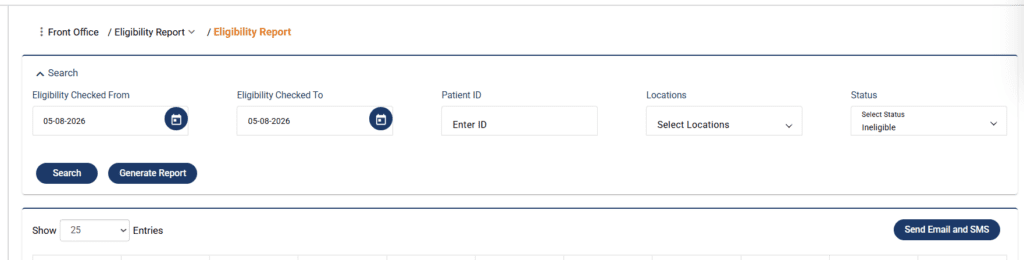
In the screen shown in the image below:
- Select the location you want to schedule eligibility for
- Select the providers
- Configure the run schedule
- Selecting the day and time on which eligibility should run
- Select the appointment day/s for which eligibility should be verified on the selected day
- Add Email and SMS content
- This email and SMS will be sent to ineligible patients only
- Add content relevant to ineligible patients
- Select if you want to automatically send email and SMS to ineligible patients
- You’ll find a toggle button
- When turned on, system will automatically send email and SMS to ineligible patients
- When off, a user can manually send email or SMS to patients
- Save your settings to activate the scheduled batch run
Once configured, the system will automatically process eligibility checks for all appointments on the selected date.
Eligibility Verification report #
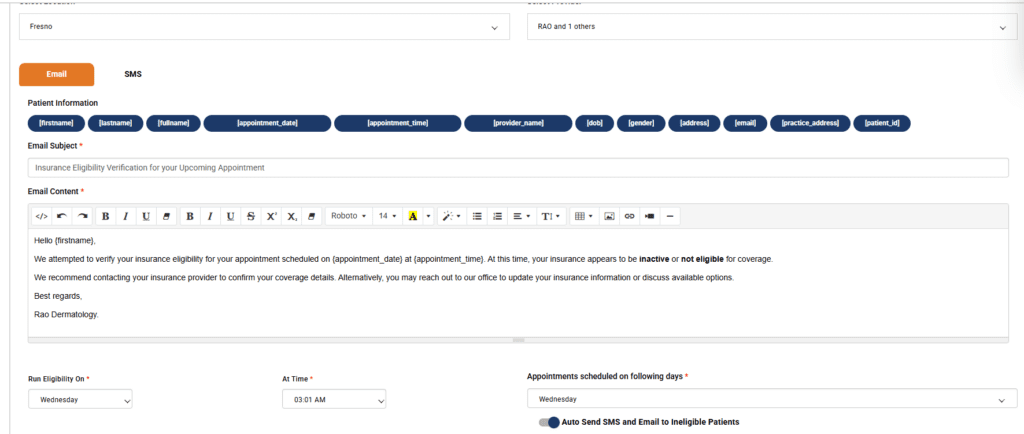
The report for all the patients whose eligibility was checked in a batch can be found in Admin –> Front Office –> Eligibility report.
- Go to Admin
- Go to Front Office
- Navigate to Eligibility report
The report displays all the patients whose eligibility was checked within a specified date range. The report shows:
- Patient details
- Eligibility status
- Appointment date & eligibility verification date
- Patient communication status: whether ineligible patients have been informed or not
- Note; which displays any errors that were encountered during verification process
Ineligible Patient communication #
For ineligible patients, offices can configure whether they want to automatically or manually reach out to patients via email and SMS.
Automatic communication #
- Go to Settings
- Go to Batch eligibility
- Edit a schedule
- At the bottom, you’ll see a toggle
- Turn it on
When this toggle is on, system automatically sends out emails and SMS to ineligible patients with each batch run. Patient Informed status in the eligibility run will change for ineligible patients who were sent comm.
Manual communication #
- Go to Admin
- Go to Front-Office
- Go to Eligibility Report
- Select date range
- Filter out Ineligible patients using the Status filter
- Check the checkbox with patient records
- Click on Send Email & SMS button
- When you send the email, Patient informed status should be updated for the patient