
Table of Contents
Grouping Insurance Carriers for Fee Schedule Management #
Overview #
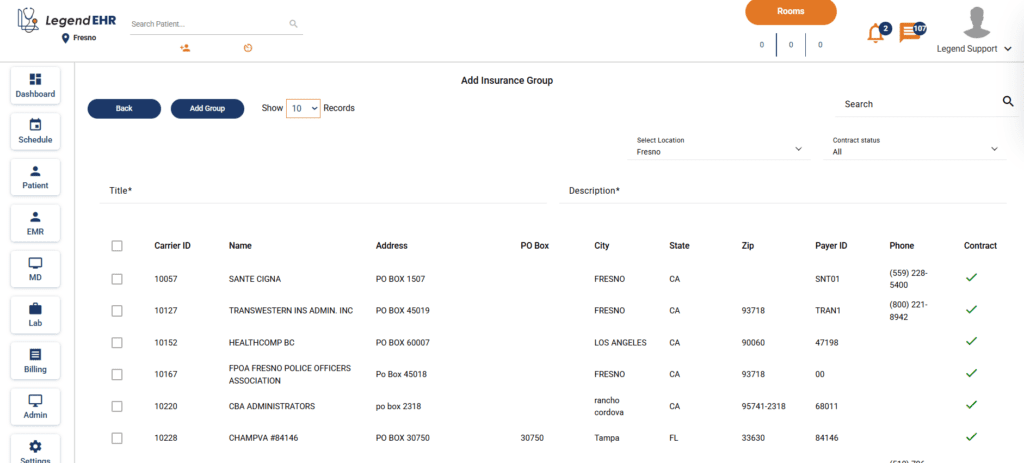
A tab Insurance Groups is available under Settings, giving offices a dedicated space to group related insurance carriers under a single umbrella payer. This feature is scoped to fee schedule management.
Creating and Managing Groups #
- Go to Settings → Insurance Groups,
- Click Add
- You can create a named group (e.g., “United Healthcare”)
- Add a description
- Add any number of carrier variants to it by checking the carriers
- Click Add Group
You can add, delete and edit groups.
Note: Groups are not shared within locations; a group will only be available at the location you created it on.
Location-Based Fee Schedules #
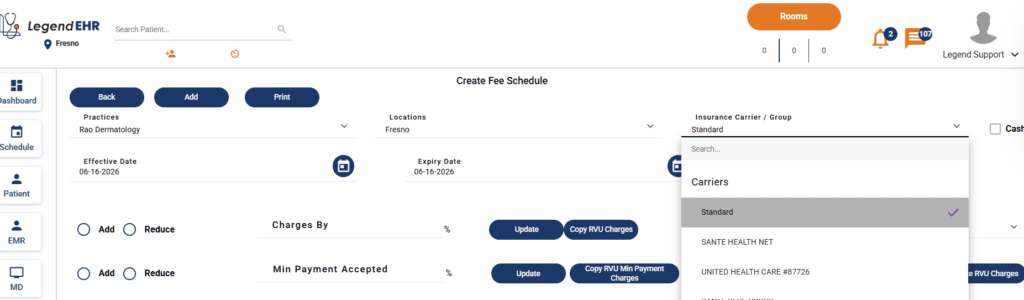
A separate fee schedule can be assigned to each group per location. The system automatically applies the fee schedule matching the patient’s service location. For example, AETNA 60054 shared between Fresno and New York will use the Fresno fee schedule for Fresno patients and the NY fee schedule for New York patients.
- Go to Settings
- Go to Fee Schedule tab
- Click Add
- Select the Group you want to create Fee Schedule for
- Select the location
Built-In Validations #
The system enforces three rules to prevent billing conflicts:
- Only one fee schedule can exist per group per location. Attempting to create a duplicate will be blocked with a validation error.
- A carrier can only belong to one group at a time. Once assigned, it will be hidden when setting up other groups.
- Removing a carrier from a group restores its availability for assignment elsewhere.


